olai runs a coding agent beside your notes. Pick an agent, sign in once, then type while it works.
Pick an agent
A conversation is one chat with one agent, drawn on its own page, which a pane shows.1 What each agent needs:2
| Agent | Needs |
|---|---|
| Claude Code | nothing: olai ships its adapter |
| Codex | nothing: olai ships its adapter |
| OpenCode | opencode on the server’s PATH |
| Pi | pi on the server’s PATH |
| Oh My Pi | omp on the server’s PATH |
With none installed, the conversation says No agent yet. and lists what to install.3
What differs between the agents
Anything an agent does not offer is not drawn. The differences you meet while typing:
| Agent | A message sent while it works | Interrupting | Agents it sends out |
|---|---|---|---|
| Claude Code | waits at the agent, marked queued, until the agent picks it up | Interrupt | their work opens behind a button of its own |
| Codex | reaches the agent during the turn and changes what it is doing | Interrupt | their work opens behind a button of its own |
| OpenCode | reaches the agent during the turn and changes what it is doing; a plain second message is refused with Session already has an active ACP prompt | Interrupt | their work opens behind a button of its own |
| Pi | waits at the agent, which tells you its place in the queue | no control is drawn | every call is drawn in the main column |
| Oh My Pi | replaces the turn: the running turn ends cancelled and your new message is answered | no control is drawn | every call is drawn in the main column |
Each agent’s own page says what else it supports. What a conversation does with the work of an agent it sent out is on giving an agent work.
Sign in
An agent that is not signed in cannot answer you, so olai shows the ways that agent offers. Type /login to sign in first.4 There are three kinds:
- a command olai runs for you5
- a sign-in page the agent opens6
- a command you type in a terminal on the server7
Only one sign-in runs at a time for each agent.8
Read the chat page
The page says what the chat is about.9 One line under that says who you are talking to and what it is doing:10
- the account it is signed in as11
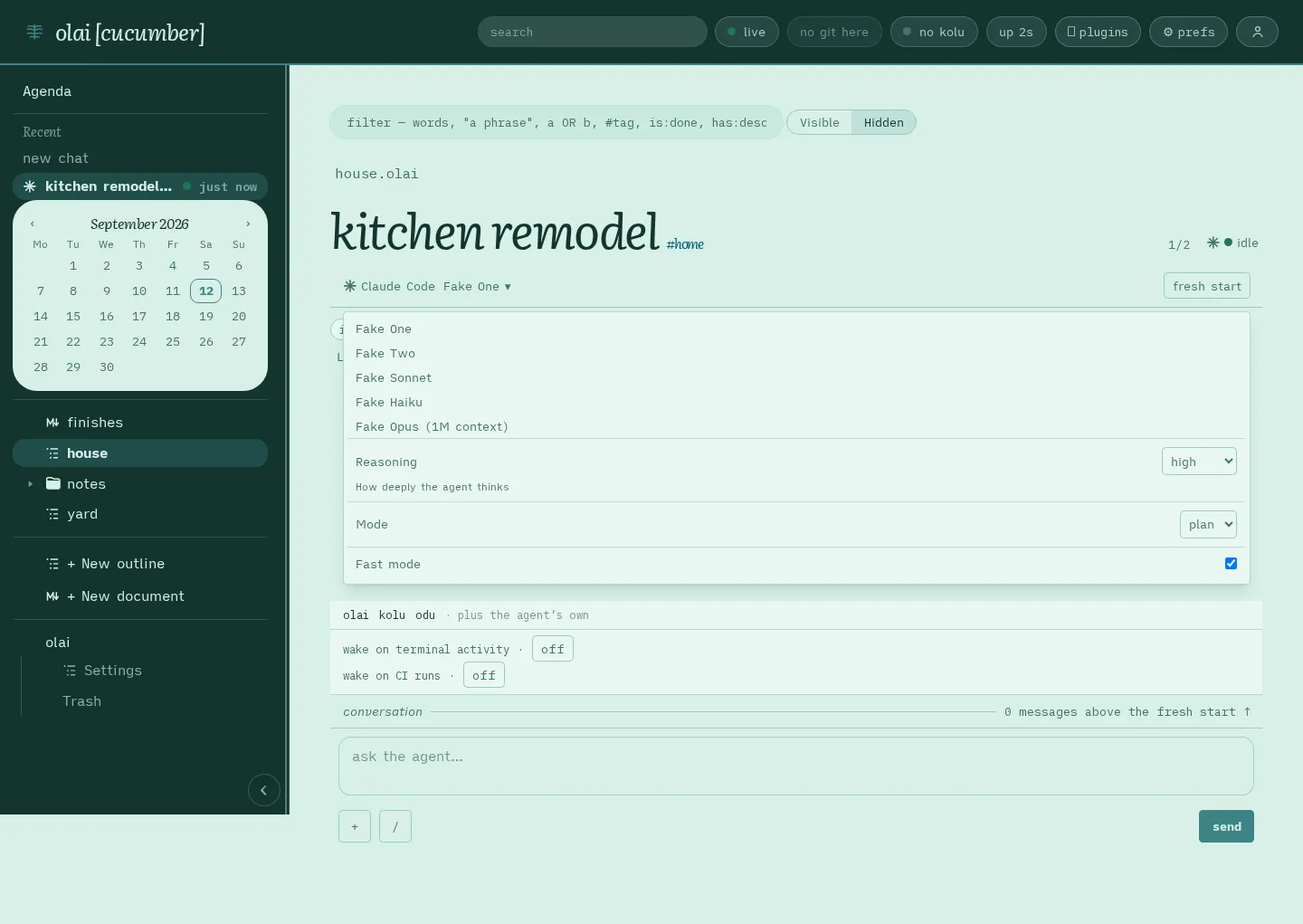
- the model it uses, which you can change12
- how full the model’s context is, such as
22k/1M13 - Working…, Waiting on you or Ready
Type while the agent works
Press Send at any time.14 Cancel stops the turn, which is the agent’s work on your last message.15 Interrupt (Alt + Enter) cuts into a turn that is running.16 Plans and command output appear as they arrive.17 One word under your message says what became of it.18
What the word under your message means
| Word | Means |
|---|---|
| queued | the agent has your message and answers it after the ones in front of it |
| not sent | nothing took the message; press Send again |
| no answer — it may not have arrived | read what the agent did next to see whether it got the message |
Long conversations and restarts
A conversation opens with its newest sixty messages.19 A restart reopens up to eight that were open.20
The agent's settings, /model, and models after a restart
Besides the model, an agent may offer settings such as how much reasoning it does, which mode it operates in, or a switch such as fast mode, under whatever names and values that agent chooses. You can change all of them while the conversation is idle, and changing the model can change which of the others are offered. If the agent refuses a change, olai keeps the value the agent confirmed and shows the agent’s reason.
Claude Code also takes /model typed in the box. The agent line then names the model the agent is running, and it changes one turn late: the agent announces the model as a turn starts, so the turn that ran the command still names the model it began on. A model the picker does not list is shown under the identifier it arrived as, and never rounded to the nearest model in the list.
The agent reads its account again at every handshake, every conversation it opens and the start of every turn, so a /login you run elsewhere shows up on your next message.
A model you chose comes back after a restart, and the agent line names it before you type. A model you switched to in a terminal while olai was not running is overwritten, because olai reapplies what it recorded. If the agent will not take the model olai asks for, the conversation opens on the model the agent chose instead, with the reason on a line of its own.
What a plan and a command's output look like, and when a turn fails
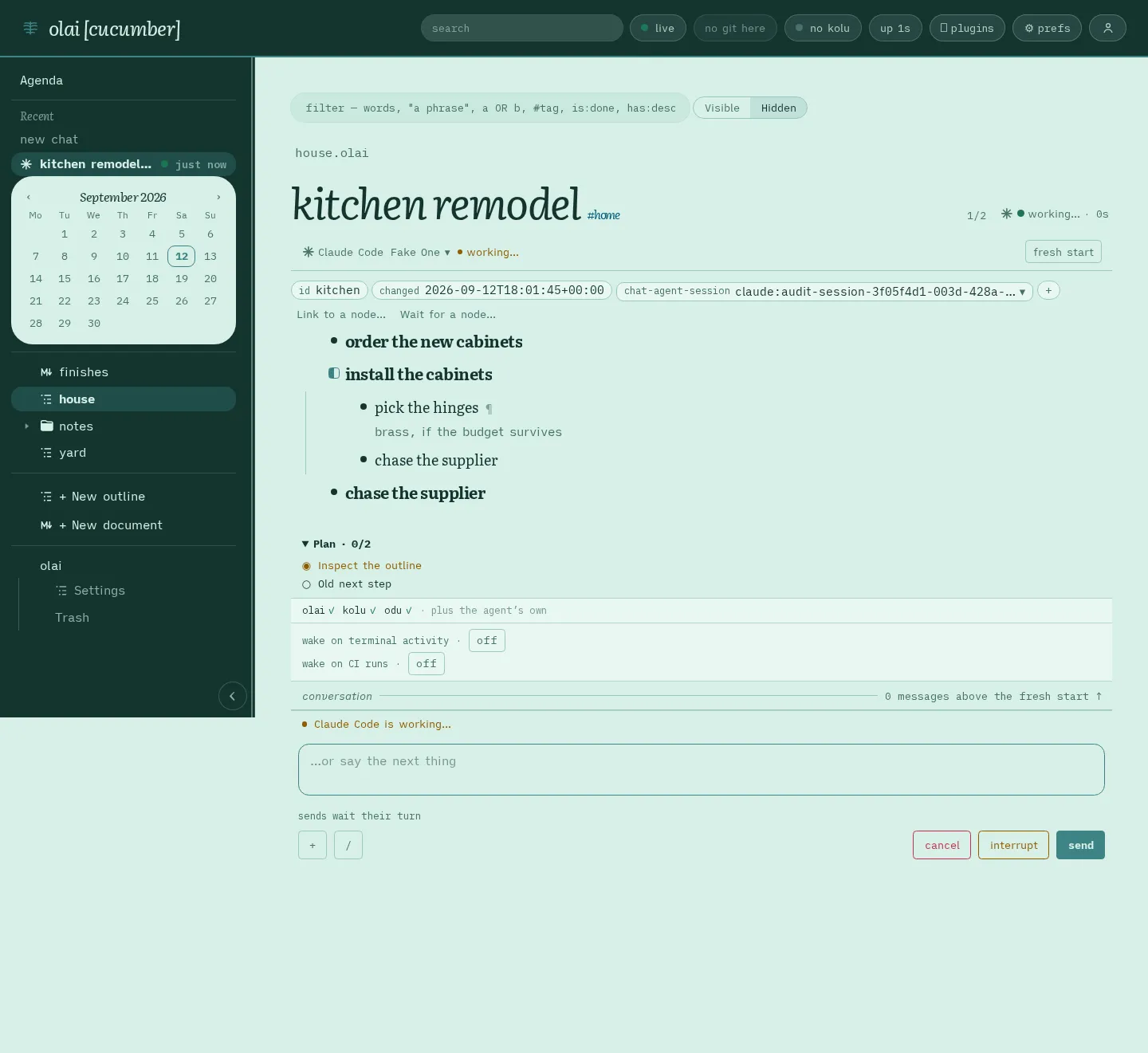
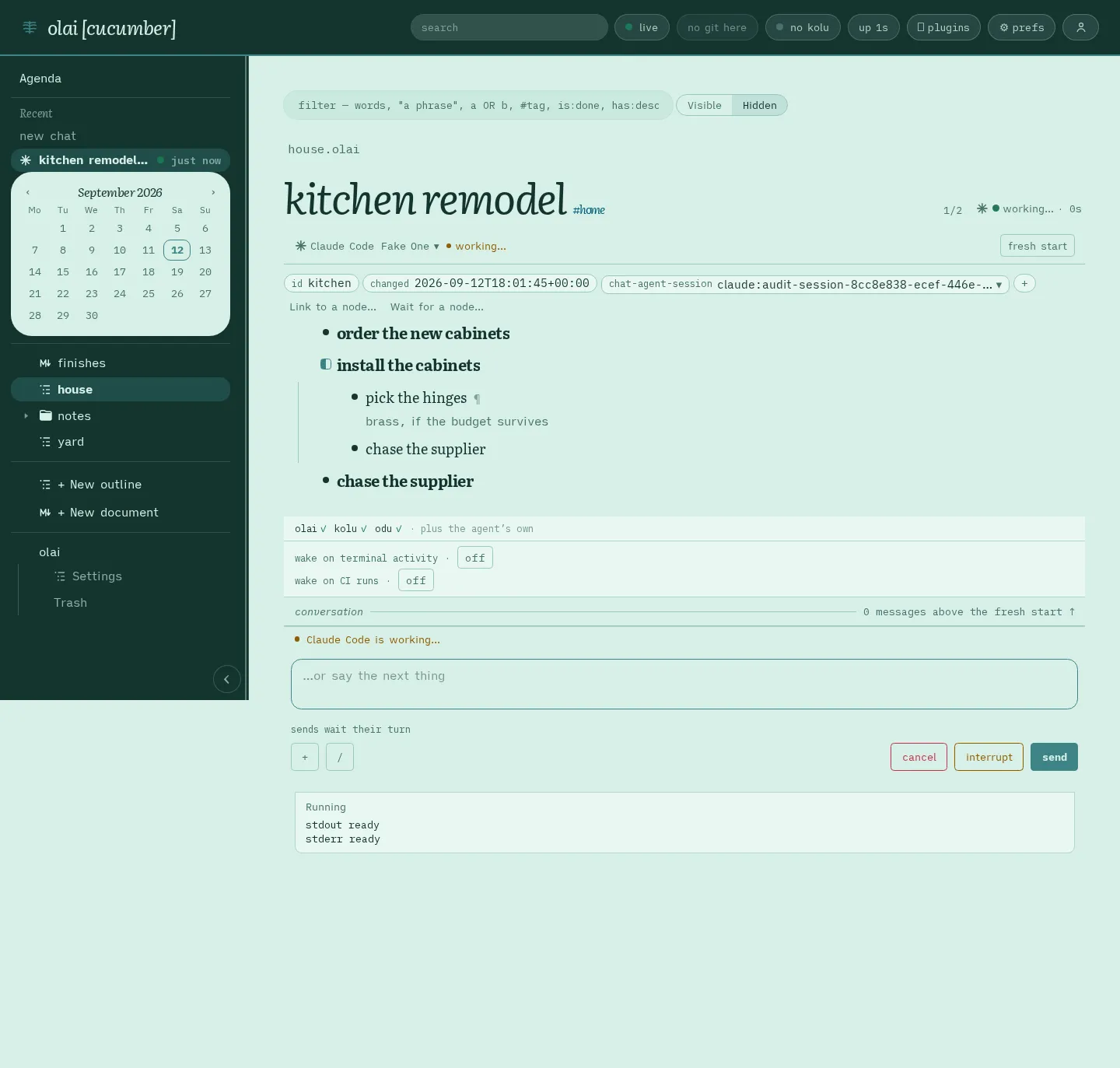
Output keeps the newest whole characters and says that it was cut: 64 KiB by default, and up to 1 MiB where the agent asks for more. Commands that olai itself runs start in the directory olai serves, unless the agent gives an absolute directory, and cancelling stops them together with the processes they started.
A tool call that failed discloses what it was asked to do rather than what came back. The reason is already on the call’s own line, and showing it again under the line would say one error twice.
When the agent asks you something through a form, the form is the only thing drawn: the call it asked through gets no line of its own, because the question is already the question.
A turn that ends having produced nothing gets a notice naming the agent and asking you to check that it is signed in, and that its provider key is set in the environment olai itself runs in.
When the agent refuses to open a conversation, olai says The agent couldn’t open a chat. with the agent’s reason, a Try again button, and, where this is the row’s current chat, Start fresh chat. Two other refusals have screens of their own: a chat this machine has no record of, and every seat being taken (node agents).
What comes back after a restart, and unsent words
When olai starts again it reopens the conversations that were open when the process stopped. It keeps at most eight. A turn that was running is not recovered, so the reopened conversation is idle and its box is ready for you.
olai drops the entry for a row that was trashed or whose link to its chat was taken off, for an agent that refuses to resume or asks to be signed in, and for an agent that has been uninstalled.
Words typed into a box that starts a chat belong to that document and that box, so leaving the page and coming back finds them. That is the box in the line at the top of a document, and the one a chat’s own page draws for an item with no chat yet. The Ask about box on a row’s page is kept the same way.
Footnotes
-
Each agent is a plugin, one of the parts the Plugins panel lists. Switching that plugin off takes away the choice of that agent and leaves the other agents alone (choosing what runs). Which rows and documents can have a chat, and every way to start one, are on node agents. ↩
-
Each of these agents is started by a helper program, called an adapter, and you can name a different one:
KOLU_ACP_AGENTfor Claude Code,OLAI_ACP_CODEXfor Codex,OLAI_ACP_PIfor Pi. An empty value for one of the three variables makes that agent unavailable, with an explanation, and leaves the other agents alone.OLAI_AGENT_PATHis where olai looks for these commands, and it replacesPATHrather than adding to it. Set it when olai’sPATHis not your shell’s, which is what running olai as a service costs you (keeping it running). ↩ -
Under No agent yet., the heading Install one of these to start an agent: lists every agent whose plugin is on and whose command this machine has not got. Each entry says why that agent is unavailable, with a link where a link helps. The last line says your notes work without any agent. olai looks for each agent’s command once when its plugin starts, so after installing a command, switch that plugin off and on again. ↩
-
You need not wait to be refused: as soon as the agent reports that nobody is signed in, the ways in are on screen. A refusal for want of a signature is the other door, and olai reads one as a request to sign in.
A row whose chat belongs to an agent whose plugin is off shows only that agent’s reason, because a different agent may still be available. The Plugins panel says the same of an agent whose command is missing. ↩
-
A sign-in command, which Claude Code offers, runs in the directory olai serves. Its output appears in the conversation as it is printed, with any addresses in it clickable, and one line of it takes the code you type. Exit code 0 means it worked, even when you pressed cancel just before the command finished. Any other exit code leaves the output on screen with a way to try again. ↩
-
A sign-in page is shown as a card holding the agent’s own message, the host the page is on, and a link to it. The agent tells olai when the page has done its job, and the request the agent was waiting on is answered. ↩
-
Some agents sign in through a series of questions in a terminal, as OpenCode does. For those, you see a label and the exact command to type in a terminal on the server, and no button. A box for an API key is never offered, so an agent whose only way in is an API key is listed without one. Any other kind of sign-in that olai has no way to run is left out the same way. ↩
-
Pressing the same sign-in method a second time joins the attempt already running; pressing a different method is refused. So two browser tabs can watch one sign-in and either can finish it, and cancelling stops it. After you sign in, olai retries what you asked for, and a message refused because the agent was not signed in stays marked not sent, with its words back in the box.
You can sign in before a conversation exists: the first start records only which agent you chose, and the conversation is written down once the agent opens one. ↩
-
One line at the top of a chat’s page stays in view: the name of the row or document it is about, how the chat stands, and Open plan beside ›. That button puts the row or document in the pane beside the conversation (node agents). The path and the agent line scroll with the conversation. Open a chat from Chats, from a document’s top line, or from a row that has an agent. ↩
-
The agent line carries the agent’s icon and name, and one of these states: Starting…, Working…, Waiting on you, Ready, Not running or Not set up. Its buttons sit at the right: Fresh start and Close. Close unties the chat from the row or document, and olai then shows that conversation nowhere (node agents). Under a row, or on a row’s page, the first button is Open beside › and Show in outline › sits beside it. ↩
-
The account reads
Claude Max · [email protected]for a subscription,Anthropic API key · apiKeyHelperfor an API key or a gateway, andNot signed inwhen the agent looked and found nobody. The organization, the plan and the rest of the detail are in the tip that hovering shows, and pressing the account opens the sign-in chooser. An agent that reports no account shows none, which is not the same as being signed out. Pi, Oh My Pi and OpenCode report no account. ↩ -
Press the model’s name to open Change model. Type in its filter box to narrow the list, walk it with the arrow keys, and press
Enterto take the model under the cursor. The box matches the agent’s own identifier for a model as well as its display name. A model your account cannot use says so, and you can still pick any other row.The closed block at the foot of this page covers the agent’s other settings and
/model. ↩ -
22k/1Mmeans the conversation holds 22,000 tokens of the 1,000,000 the model takes. The agent sends that number several times during a turn, so it moves while the agent works. It is a fraction rather than a percentage because the limit changes with the model.An agent that reports no number leaves the line blank, which is different from a conversation that has spent nothing and says
0/200k. You see that before a new conversation’s first turn, and when you open a stored conversation, which replays its messages without any report of usage. The next turn fills the number in. ↩ -
The box never locks, and Send says the same thing the whole time. While a turn runs, Cancel sits beside Send, and on an agent that takes interruptions, Interrupt sits between them. What you send goes to the conversation on screen when you press. A browser tab that has moved to another row cannot send, interrupt, cancel or retry here, and the refused text, with the files and rows attached to it, goes back to the conversation it came from. ↩
-
Pressing Cancel stops the turn and nothing else. Messages waiting behind it are already at the agent, so they survive and are answered next. ↩
-
An interruption reaches the turn that is running, so whatever the agent was in the middle of is thrown away to make room for your message. Once a conversation has queued a message, it stops offering the control for the rest of its life, and
Alt+Enterthen sends an ordinary message. A new conversation offers the control again. ↩ -
An agent that sends a plan draws Execution plan under the agent line, listing the steps it has not started, the one it is on and the ones it has finished. Each update from the agent replaces the whole plan, an empty plan removes it, and starting another conversation clears it.
A tool call that runs a command shows the command’s output as it arrives, then its exit code or the signal that killed it. The output stays readable after the agent closes the terminal. The closed block at the foot of this page has pictures of both. ↩
-
A line under the transcript says what is happening (working…, starting…, or that the turn has stopped on a question), and it goes as soon as nothing is happening. Queued means the agent is holding your message until the turns in front of it end; the word goes by itself.
Not sent means the message or interruption was refused, or the agent was not running, or you cancelled while it was on its way. Send again sends it for the first time, as an ordinary message. After no answer olai offers no button, because sending again could deliver a second copy. ↩
-
A conversation opens at its newest message, and Earlier messages sits above the transcript only when there are older ones. Pressing it fetches the messages before what is on screen, so you walk back through the conversation a page at a time, and the button goes once you reach the first message.
New text follows along while you are at the bottom, and scrolling up keeps your place. Reconnecting never takes a message away, and a short break in the connection is invisible. ↩
-
On starting again, olai reopens those conversations, most recently used first, before any browser asks for one. A reopened conversation is closed 48 hours after it was last used, however many restarts fall in that time, and one already older than that when olai starts is dropped. The entry for an agent whose plugin is off waits, so switching that plugin back on brings the conversation back. ↩